User Task Type Node Action
This feature is not yet part of a stable iDempiere release and may change.
Goal: Technical
Developer: Deepak Pansheriya (Logilite Technologies)
Feature Ticket: IDEMPIERE-6246
Enhancing iDempiere Workflow with User Task Type Node Action
Limitations of User Choice for Offline Actions
In workflows requiring offline actions such as validating data, calling a customer, or conducting a background check, the existing User Choice node has the following constraints:
- Mandatory Value Assignment: The User Choice node requires users to set a column value upon action confirmation. Sometimes the user only needs to confirm that the task is done.
- Automatic Execution for Responsible Users: If the current logged-in user is a workflow responsible, the node does not suspend for confirmation and directly completes execution of the node.
- Tasks Requiring Explicit Completion: Workflow steps that involve tasks instead of approvals must suspend until the user confirms that the task is completed.
This behavior leads to a problem where a responsible user executing a workflow does not receive a task confirmation prompt, causing unintended automatic progression.
Solution: Introducing User Task Type Nodes in iDempiere
To overcome these limitations while preserving User Choice behavior, a new User Task option is introduced for workflow node action.
Behavior of User Task Node
- Always Suspends: The workflow pauses at this step, regardless of whether the current user is responsible for execution. This ensures explicit task confirmation before proceeding.
- Mandatory User Confirmation: The user must manually confirm task completion, preventing auto-advancement.
- Accepts User Input: Allows specifying columns for user selection during task confirmation (for example, List type or Yes-No reference type).
- Does Not Abort Workflow: Unlike User Choice, where selecting
Naborts the workflow, User Task enables reassignment or alternative routing without terminating execution. - Supports Non-Aborting Approval Handling: Allows workflows where rejection triggers task reassignment instead of stopping the workflow process.
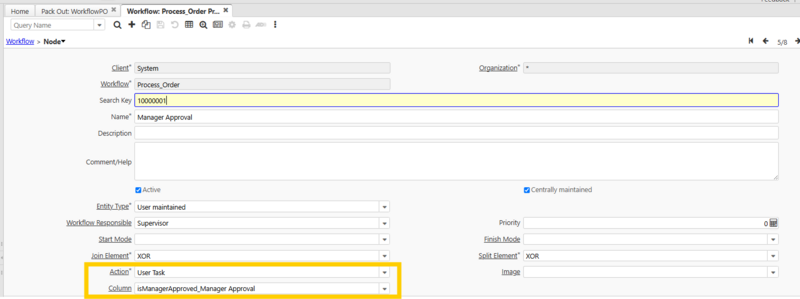
Example Use Case: Procurement Workflow Handling
Consider a purchase order (PO) approval workflow where the procurement department finds an issue. Instead of aborting the workflow, the User Task node facilitates reassignment for corrective action.
Configuration Steps
- Define Approval Workflow Node as User Task Type
- Configure the node to reference a Yes-No or List column.
- Set Up Workflow Transitions
- Add two or more transitions with conditions based on the user input column:
- Success Flow: Proceed when provided value is Yes.
- Rejection Flow: When user provides
N, assign to another workflow node for corrective action.
If the procurement team rejects the PO, the workflow reassigns it to the initiator for corrections instead of aborting it.
Impact on iDempiere Workflow Execution
By implementing the User Task type node action, workflows gain improved flexibility for handling task-based execution, ensuring manual confirmation, explicit reassignment, and non-aborting approval mechanisms.