Welcome Page
Goal: Usability
Sponsor: Trek Global
Description:
The welcome page has been redesigned to provide more configuration and better information to the user.
One important feature is that portlets can now be configured system wide, client wide, or even per role or per user.
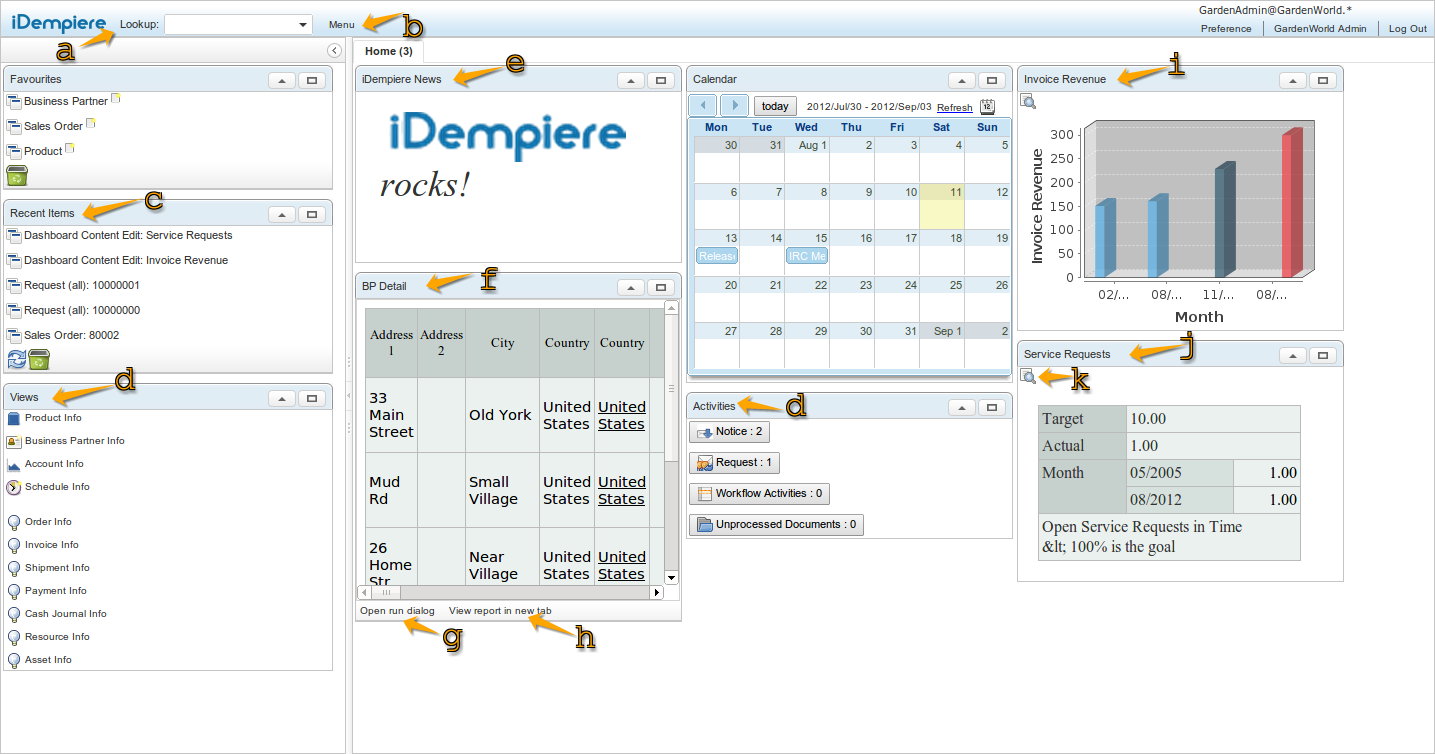
a) Lookup
Lookup was moved to the top in order to allow search on the menu even if the left panel is collapsed.
As usual the lookup box also supports slash ( / ) configurable shortcuts - for example test filling lookup with "/O 80001" in GardenWorld (without the quotes)
b) Menu
The menu was moved from the left panel to the top and is now a popup window. More information about this on Feature Menu
c) Recent Items
The recent items are direct access to records that the user recently created/updated or touched (meaning with touched the user changed a field, even if not saved)
You can delete items from your recent items dragging them to the bin below.
The number of items shown can be configured via System Configurator, as well as the number of items saved.
d) Portlets position preserved
The portlets can now be moved by the user from the dashboard to the left panel and viceversa, and positioned around the columns and lines. The preference of the dashboards is preserved between sessions per user. Portlets collapse status is also preserved.
e) HTML Portlets
Now you can add HTML portlets, useful for example to make announcements, client wide, role wide or user specific.
f) Report Portlets
Portlets support now embedded reports (or simple links) - you can pass parameters to the embedded report even using context variables.
g) Direct run to report
The report portlet allows the user to run the report opening the parameter window from this button.
h) Open report on tab
Or the user can also open the full report in a new tab.
i) Chart Performance Indicator
Portlets for specific indicators can be configured as a chart.
j) HTML Performance Indicator
or as an HTML table
k) Open Performance
and the performance indicator can be opened using this button.
Technical Info: IDEMPIERE-357
Known Issue
- New created dashboard content will not appear in the dashboard if the dashboard preference for the specified user and role already exists
Source: Wiki