Field Event Rules
- Maintainer: Diego Ruiz - BX Service GmbH
- Sponsor: Energy Kinetics, Inc.
- Status: Beta, not tested in production
- License: GPLv2
- Sources: GitHub
Field Event Rules let you define "when this field changes, do that" logic directly inside the iDempiere Application Dictionary without writing Java code, installing plugins, or touching an IDE.
Think of it as a lightweight form event system: you attach rules to fields or columns, describe what should happen in plain SQL or a simple expression, and the system takes care of executing them both in the UI and when records are saved through any channel.
What you can do with it
- Auto-fill fields: when a user picks a Business Partner, automatically populate the Payment Term, Price List, or any other field from a lookup.
- Copy values between fields: when an Org is selected, default the Warehouse from that org's configuration.
- Conditional defaults: set a field only when it is currently blank, leaving intentional values untouched.
- Validate data: show an error or warning when a value breaks a business rule, either immediately when the field is changed or when the record is saved.
For rules with a Save trigger, this applies regardless of how the record was created: a window, a background process, a data import, or the API. UI triggers only fire in the browser when a user interacts with the field. For a detailed comparison, see Event handlers vs callouts.
How it works conceptually
A Field Event Rule sits between a field (or column) and a piece of logic you define. It has three parts:
1. Trigger - when does it fire?
- On field change (UI / callout): fires immediately in the UI when a user leaves the field, the same moment a callout would. Does not fire on background saves.
- On save (model): fires when the record is being saved, regardless of how it was created. Runs after the user clicks Save, or when a process/import writes the record.
- Both: fires at both moments, so the UI stays responsive and data consistency is guaranteed for non-UI operations too.
2. Condition (optional) - should it fire this time?
An optional guard expression. If it evaluates to false, the rule is skipped entirely. Useful for rules that only apply in certain situations (e.g. only on Sales Orders, only when the amount exceeds a threshold).
3. Actions - what happens?
One or more ordered steps. Each action sets a field to a computed value, clears it, or validates it.
Where to configure rules
Open the Field Event Rules window from the Application Dictionary menu (System tenant or your tenant, depending on your access).
Rules configured in the System tenant apply to all tenants in the system. You can also configure tenant-specific rules that only apply to that tenant's records.
This window supports SQL statements and is marked as advanced. Only roles with the Advanced flag enabled can access it.
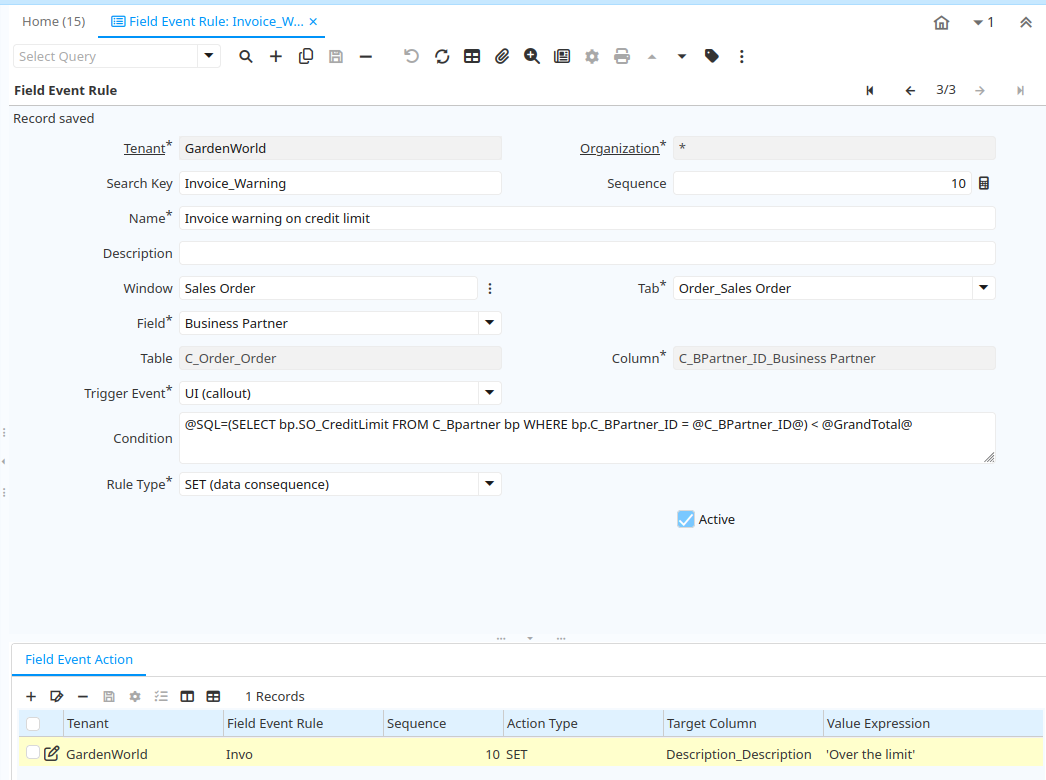
Each rule record has:
| Field | What it does |
|---|---|
| Name | A label for the rule, shown in lists |
| Window / Tab / Field | Scope the rule to a specific place in the UI. Leave blank to apply model-wide. |
| Table / Column | Attach the rule at the column level so it fires for any window using that column. |
| Trigger | On field change / On save / Both |
| Execution scope | UI only / Model only / Both |
| Condition | Optional guard (see Conditions below) |
| Rule type | SET (data consequence) or VALIDATE |
| Active | Enable or disable without deleting |
| Sequence | Controls execution order when multiple rules exist on the same field |
Below each rule you define its Actions (what to do) and optionally Parameters (named values to simplify your expressions).
Scoping a rule
Rules can be scoped at two levels and you can combine them.
Field-level scope (UI-specific): attach a rule to a particular field in a specific Window + Tab. The rule only fires when a user interacts with that field in that window. Use this when the logic is UI-specific or when the same column behaves differently in different windows.
Column-level scope (model-wide): attach a rule to a column on a table. The rule fires whenever any record on that table is saved, regardless of which window was used, or even if no window was involved. Use this for data integrity rules that must hold universally.
If you want a rule to do both - show responsive feedback in the UI and enforce the consequence on save - set the Trigger to "Both" and the Execution Scope to "Both". The engine avoids double-applying the same value when the UI path already set it.
If you leave the Window (and Tab / Field) blank, the rule applies to every window that uses the configured table/column. Use this when the logic should be universal rather than window-specific.
Conditions
The Condition field is an optional guard that must be true for the rule to execute. Two formats are accepted.
Context expression
Uses iDempiere's standard variable syntax. Variables in @Brackets@ are resolved from the current record and session context.
@IsSoTrx@=Y
@GrandTotal@ > 100
@IsSoTrx@=Y & @GrandTotal@ > 100
@C_BPartner_ID@ > 0 | @IsAnonymous@=Y
Operators: & means AND, | means OR. Each clause compares a @Variable@ to a value.
SQL WHERE clause
Starts with @SQL= followed by a SQL WHERE clause. If it returns any row (or evaluates to true), the rule proceeds.
@SQL=EXISTS (
    SELECT 1 FROM C_BPartner bp
    WHERE  bp.C_BPartner_ID = @C_BPartner_ID@
      AND  bp.IsCustomer = 'Y'
)
@SQL=@GrandTotal@ > (
    SELECT SO_CreditLimit
    FROM   C_BPartner
    WHERE  C_BPartner_ID = @C_BPartner_ID@
)
If the Condition is left blank, the rule always fires (subject to Trigger and Active).
Actions
Each rule has one or more actions, executed in sequence order. An action either sets a value on a field or validates a condition.
Action types
SET - always writes the computed value to the target column, overwriting whatever is there.
SET IF BLANK - writes the computed value only if the target column is currently empty. Useful for defaults that should not override intentional entries.
CLEAR - sets the target column to null. No expression needed.
Value expressions
The expression that produces the new value can be written in two ways.
SQL scalar subquery - any expression starting with SELECT. Must return a single value (one row, one column).
@SQL=SELECT p.PriceStd
FROM   M_ProductPrice p
WHERE  p.M_Product_ID           = @M_Product_ID@
  AND  p.M_PriceList_Version_ID = @M_PriceList_Version_ID@
  AND  p.AD_Client_ID           IN (0, @#AD_Client_ID@)
FETCH FIRST 1 ROW ONLY
Arithmetic / inline expression - for simple calculations without a full query.
@QtyOrdered@ * @PriceActual@
@SQL=CASE WHEN @IsSOTrx@ = 'Y' THEN @PriceList@ ELSE @PriceStd@ END from dual
Variable substitution in expressions
Use @ColumnName@ to reference any value from the current record. The engine resolves these before executing the SQL.
| Syntax | Resolves to |
|---|---|
@ColumnName@ | Current value of that column in the record |
@Table.ColumnName@ | Value of a column on a related table, resolved via the current record's foreign key (e.g. @C_BPartner.Description@ reads the Description from the linked Business Partner) |
@#Variable@ | Global system context (e.g. @#AD_Client_ID@) |
@$Variable@ | Window-level context |
If a variable cannot be resolved, it is substituted with NULL and a warning is logged. The rule continues rather than failing hard.
When you save a rule configuration, the system performs a dry run to detect malformed SQL before the rule can affect real data. Fix any reported syntax errors before the rule will activate.
Examples
Example 1 - Fill description and check credit status from Business Partner
When the Business Partner is changed on a Sales Order, copy the partner's description into the order's Description field and write a credit status indicator into PO Reference.
| Field | Value |
|---|---|
| Window | Sales Order |
| Tab | Order |
| Field | Business Partner |
| Trigger | On field change (UI) |
| Rule Type | SET |
Action 1 - copy the partner description:
| Field | Value |
|---|---|
| Type | SET |
| Target | Description |
| Expression | @C_BPartner.Description@ |
Action 2 - write credit status into PO Reference:
| Field | Value |
|---|---|
| Type | SET |
| Target | POReference |
| Expression | SELECT CASE WHEN @GrandTotal@ <= SO_CreditLimit THEN 'OK' ELSE 'Over the limit' END FROM C_BPartner WHERE C_BPartner_ID = @C_BPartner_ID@ |
Example 2 - Validate credit limit on Business Partner change
Warn the user immediately when the order's Grand Total already exceeds the selected Business Partner's credit limit. The Condition pre-checks the limit so the VALIDATE action only fires when there is actually a problem.
| Field | Value |
|---|---|
| Window | Sales Order |
| Tab | Order |
| Field | Business Partner |
| Trigger | On field change (UI) |
| Condition | @SQL=(SELECT bp.SO_CreditLimit FROM C_BPartner bp WHERE bp.C_BPartner_ID = @C_BPartner_ID@) < @GrandTotal@ |
| Rule Type | VALIDATE |
Action:
| Field | Value |
|---|---|
| Type | VALIDATE |
| Expression | (evaluates to N - the Condition already ensures this fires only on violation) |
| Message | Grand Total exceeds the credit limit for this Business Partner. |
Example 3 - Auto-set Drop Ship flag based on delivery region
When the Partner Location is selected on a Sales Order, automatically enable Drop Ship if the delivery address is in New Jersey.
| Field | Value |
|---|---|
| Window | Sales Order |
| Tab | Order |
| Field | Partner Location |
| Trigger | On field change (UI) |
| Condition | @SQL=(SELECT l.RegionName FROM C_Location l JOIN C_BPartner_Location cbl ON l.C_Location_ID = cbl.C_Location_ID WHERE cbl.C_BPartner_Location_ID = @C_BPartner_Location_ID@) = 'NJ' |
| Rule Type | SET |
Action:
| Field | Value |
|---|---|
| Type | SET |
| Target | IsDropShip |
| Expression | 'Y' |
Multiple rules on the same field
You can define several rules on the same field or column. They execute in Sequence Number order. Each rule sees the values already written by the previous ones, so a later rule can depend on what an earlier rule set.
If a rule has Stop on Error enabled and produces a blocking validation error, execution stops and the remaining rules are skipped.
System-level rules (configured in the System tenant) always execute before tenant-level rules. Tenant rules can build on top of or further refine the results of system rules.
Validation rules in detail
When Rule Type is VALIDATE, the action expression must evaluate to 'Y' (case-insensitive) for the validation to pass. Any other result (including NULL) is treated as a failure.
Error level controls what happens on failure:
- Error: blocks the operation. On field change (UI), a popup is shown and the field is flagged. On save (model), an exception is thrown and the record cannot be saved until the condition is satisfied.
- Warning: allows the operation to proceed, but shows a message the user must acknowledge before continuing.
Validation rules work at both the UI (immediate feedback on field change) and model level (enforced on save regardless of channel).
What rules cannot do
Rules are intentionally limited to keep them safe for implementer-level configuration.
- Expressions are read-only.
INSERT,UPDATE,DELETE,DROP, and similar statements are rejected. - Rules always run in the context of the current tenant. Cross-tenant data access is not possible.
- SQL expressions are checked for structure only during configuration. They are not executed against real data until a record is actually being edited or saved.
- Rules cannot invoke processes, send notifications, or trigger document actions. Those use cases require conventional plugin development.
Deploying rules across environments
Because rules are stored as Application Dictionary records, they are fully portable using iDempiere's standard 2Pack (Package In / Package Out) mechanism. The recommended workflow for moving rules from development to production is:
- Configure and test rules in the development environment.
- Export as a 2Pack XML file.
- Import in test, then production.
No server restart is required when a new rule is saved. The system registers it immediately.