Pluggable report format selector
Goal: Usability, Technical
Developer: Peter Takacs
Feature Ticket: IDEMPIERE-7151
Version: iDempiere 14
The problem
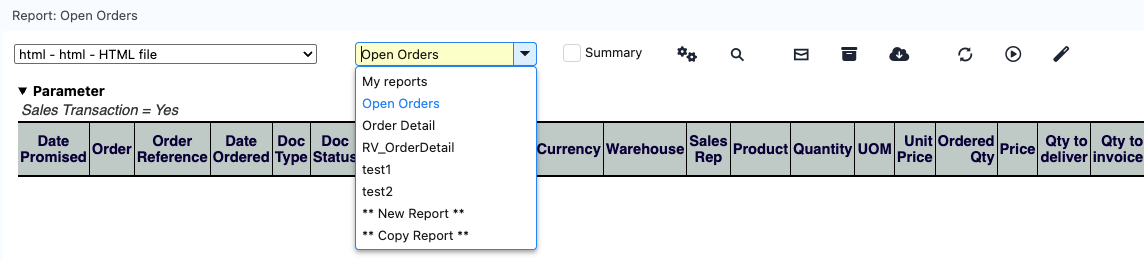
The report viewer shows the print formats of a report in a drop-down list in its toolbar. The list was a native select, so a user had to scroll through it to find a print format, and a plugin could not change it. A company with many print formats could not group them, show their descriptions or filter them without changing the core.
What changed
The selector of the report viewer is now a separate widget, and the viewer asks the OSGi service registry which widget to use.
- Default selector. Without a plugin, the viewer shows an editable combo box with the same print formats in the same order. The user can type to filter the names.
- Extension point. A plugin registers an
IReportFormatSelectorFactoryservice to replace the combo box with its own widget, for example one that groups the print formats.
The viewer still builds the list of print formats and checks the access of the role. A plugin selector only shows the entries it is given.
What users see
The print format combo box works like this:
- Start to type and the list opens. The names that match the text are shown.
- Select a name in the list to switch the report to that print format.
- Type the full name of a print format and press Enter to switch to it. The match ignores upper and lower case.
- The arrow keys move through the list without switching the report. The report changes when you pick an entry.
- If the text matches no print format, the box goes back to the name of the print format that is shown.
- The tooltip is unchanged.
The list has the same entries as before:
- The active print formats of the table of the report that the role can read, ordered by name. When the report was started from a window, only the print formats of that window or without a window are listed. When the report has a report view, only the print formats of that report view are listed.
- The entries to create a new print format and to copy the current one, only for roles that have access to the Print Format table and to the window of the print format.
When the user cancels the New or Copy dialog, the box shows the print format that is still displayed. Before, the box stayed empty.
How to replace the selector in a plugin
- Implement
IReportFormatSelector, the widget. - Implement
IReportFormatSelectorFactoryand register it as an OSGi service. - Import the package
org.idempiere.ui.zk.reportin theMANIFEST.MFof your plugin.
@Component(service = IReportFormatSelectorFactory.class, property = "service.ranking:Integer=100")
public class GroupedFormatSelectorFactory implements IReportFormatSelectorFactory {

	@Override
	public IReportFormatSelector createSelector(ReportFormatRequest request) {
		// null: this factory does not apply, the next factory or the default combo box is used
		if (request.tableId() != MyTable.Table_ID)
			return null;
		return new GroupedFormatSelector(request.compact());
	}
}
Which factory is used
- The viewer asks the factories in order of
service.ranking, highest first. A factory with the same ranking that was registered earlier is asked first. - The first selector that is not
nullis used. Returnnullfor the reports that your factory should not change. - If a factory throws a
RuntimeException, the viewer writes a warning to the log and asks the next factory. The viewer does not fail. - If no factory returns a selector, the viewer uses the default combo box.
The request
ReportFormatRequest tells the factory what the viewer is about to show.
| Member | Meaning |
|---|---|
reportEngine() | The report engine shown in the viewer |
printFormat() | The print format shown when the selector is created |
tableId() | AD_Table_ID of that print format, 0 if there is none |
windowId() | AD_Window_ID the report was started from, 0 if none |
compact() | true if the selector goes into the toolbar popup of a narrow screen, so it should be small |
The selector
| Method | What it does |
|---|---|
getComponent() | The component that the viewer adds to its toolbar or toolbar popup |
setFormats(entries, selectedKey) | Shows the entries and selects the one with the key. It does not call the selection listener |
getSelectedKey() | The key of the selected entry, or ReportFormatEntry.KEY_NONE |
setSelectedKey(key) | Selects an entry without calling the selection listener. It selects nothing if no entry has the key |
setSelectionListener(listener) | The action to run when the user picks an entry |
Rules for a selector:
- The viewer owns the list.
setFormatsgets an immutable list ofReportFormatEntrythat the viewer built after the role checks. A selector can reorder, group and decorate the entries, but cannot add one. A key that the viewer did not offer is ignored. - Identify an entry by its key, not by a widget item. The key is the
AD_PrintFormat_ID, orReportFormatEntry.KEY_NEW(-1) andReportFormatEntry.KEY_COPY(-2) for the two create entries. - Notify only for a pick by the user. Call the selection listener when the user picks an entry. Do not call it from
setFormatsorsetSelectedKey, otherwise the viewer reloads the report more than once. - Support
setSelectedKey. The viewer calls it to put the previous selection back, for example when the user cancels New or Copy.
The entries
ReportFormatEntry has these values:
| Value | Meaning |
|---|---|
key | AD_PrintFormat_ID, or KEY_NEW or KEY_COPY for the create entries |
name | The translated name |
description | The translated description of the print format. It is null if there is none and for the create entries |
clientId | AD_Client_ID of the print format, 0 for System and for the create entries |
kind | FORMAT, NEW or COPY. isFormat() is true for FORMAT |
Technical notes
- New package
org.idempiere.ui.zk.reporttypes:IReportFormatSelector,IReportFormatSelectorFactory,ReportFormatRequest,ReportFormatEntry,ReportFormatLoaderandComboboxReportFormatSelector. The OSGi componentReportFormatSelectorProvidercollects the factories, andExtensions.getReportFormatSelector(ReportFormatRequest)returns the selector to use. ReportFormatLoader.loaduses the login role,MRole.getDefault(), for the access filter. A selector cannot widen the list of print formats.- Factories can come and go while the server runs. The viewer asks them each time a report viewer opens.
- No change of the Application Dictionary or of the database.
Technical Info: IDEMPIERE-7151 | Pull Request #3396
Migration impact
The viewer lists the same print formats with the same role checks and create entries. Without a selector plugin, the order is also the same, and the only visible change is that the native drop-down list is now an editable combo box. A selector plugin can reorder, group and decorate the entries.