Default Display Mode for Detail Tabs
Goal: Usability
Developer: Nicolas Micoud (TGI)
Feature Ticket: IDEMPIERE-7063
Default Display Mode for Detail Tabs
Until now, Detail tabs always opened in Grid mode.
While this is convenient for tabs containing many records (such as Sales Order Line), it is less appropriate for Detail tabs that usually contain only one or a few records (for example Organization Information), where the Form view provides a better user experience.
This feature adds a new tab customization option allowing each Detail tab to open directly in either Grid or Form mode.
The preference is available from the Customize Grid dialog.
The Customize Grid dialog is only available when the Detail tab is currently displayed in Grid mode. If the tab is already in Form mode, temporarily switch it back to Grid to access the customization dialog.
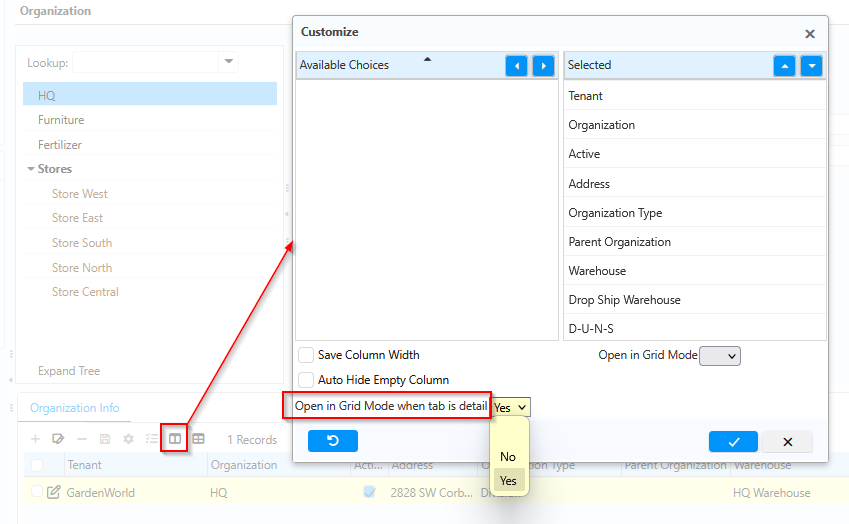
A new option has been added: Open in Grid Mode when tab is Detail
When enabled (default), Detail tabs continue to open in Grid mode.
When disabled, Detail tabs automatically open in Form mode.
This preference:
- applies only to Detail tabs;
- is stored as a user tab customization;
- preserves the existing behavior by default, ensuring full backward compatibility.
This enhancement reduces unnecessary clicks and improves usability for maintenance windows where Detail tabs generally contain a single record.