SQL Query Enhanced
- Maintainer: Sergio Oropeza
- Status: Stable, used in production
- License: GPLv2
- Sources: GitHub
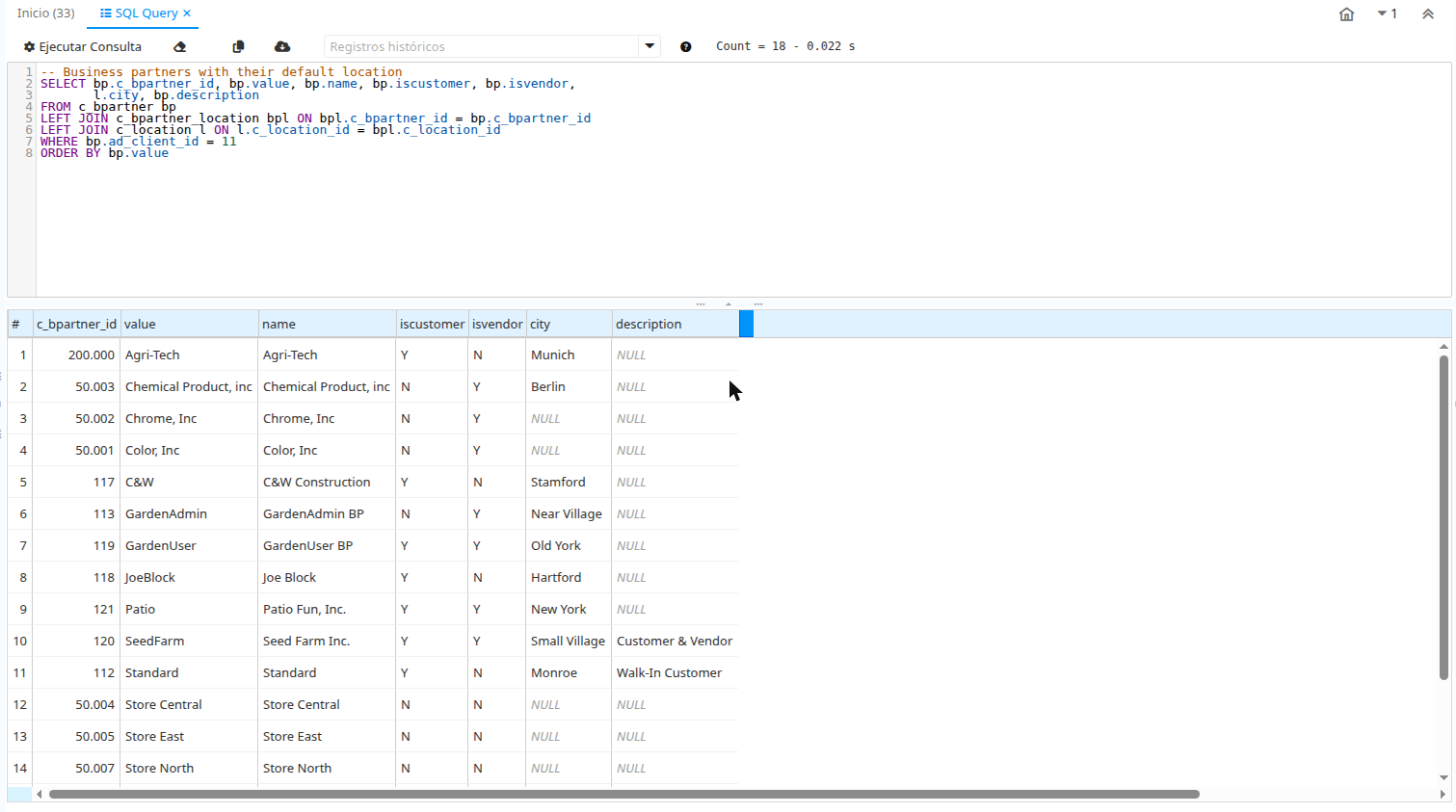
SQL Query Enhanced replaces the standard SQL Query form with a version that adds a code editor, a statement history and tools to copy and export the results.
It does not change the core form or the Application Dictionary. The plugin registers a form factory with a higher ranking, so opening SQL Query shows the enhanced form. Stopping the bundle brings back the standard form.
Features
- SQL editor with syntax highlighting and line numbers, based on CodeMirror 5. The library is bundled in the plugin, so no CDN is needed.
- Ctrl+Enter runs the statement. If text is selected, only the selection runs.
- Tab and Shift+Tab indent and unindent.
- Statement history with the last 50 statements of each user, kept across sessions.
NULLvalues are shown in grey italics.- The toolbar shows the record count and the duration of the query.
- Copy the results to the clipboard, or copy one row with a double click.
- Export the results to CSV (UTF-8).
The "?" button in the toolbar lists the keyboard shortcuts.
Versions
There is one plugin version for each iDempiere version. Download the jar from GitHub Releases.
| iDempiere | Java | Plugin version | Branch |
|---|---|---|---|
| 13 | 17 | 13.2.0 | 13.0 |
| 12 | 17 | 12.2.0 | 12.0 |
| 10 | 11 | 10.2.0 | 10.0 |
Installation
- Download
com.soropeza.sqlquery-<version>.jarfor your iDempiere version. - Open the Felix web console at
https://<server>/osgi/system/console/bundles. - Click Install/Update..., select the jar and start the bundle.
You can also install it from the OSGi console:
install file:/path/com.soropeza.sqlquery-13.2.0.jar
start <bundle-id>
The first time the bundle starts, it installs a 2Pack that creates the table for the statement history. No other setup is needed.
Security and limits
The enhanced form keeps the security logic of the core SQL Query form and uses the same System Configurator keys:
| Key | Purpose |
|---|---|
FORM_SQL_QUERY_ALLOWED_KEYWORDS | Statements that are allowed to run. Default: SELECT,WITH,SHOW |
FORM_SQL_QUERY_MAX_RECORDS | Maximum number of records shown. Default: 500 |
FORM_SQL_QUERY_TIMEOUT_IN_SECONDS | Query timeout. Default: 120 |
FORM_SQL_QUERY_LOG_ISSUE | Log each executed statement in AD_Issue, like the core form. Default: Y |
Statements run in a read-only transaction. Multiple statements separated by ; are rejected.
Code editor
Set the System Configurator key SQLQUERY_ENHANCED_CODE_EDITOR to N to use a plain text area instead of the code editor.
Statement history
Each statement that runs without errors is saved in the table SOP_SQLQueryHistory, with the user, the statement, the number of records and the elapsed time. The history combo in the toolbar shows the last 50 different statements of the current user. Selecting one loads it in the editor.
The history does not depend on AD_Issue. Cleaning or truncating AD_Issue during maintenance does not remove it.
Versions 13.1.0, 12.1.0 and 10.1.0 read the history from AD_Issue. That history is not imported into the new table.
Uninstall
Stop or uninstall the bundle from the Felix web console. The standard SQL Query form is used again. The SOP_SQLQueryHistory table and its dictionary records stay in the database.