Variables in CSS style lines
Goal: Usability
Developer: Peter Takacs
Feature Ticket: IDEMPIERE-7163
Version: iDempiere 14
The problem
CSS Styles and their Style Lines are set up as described in Styles On Fields. The Inline Style of a Style Line was used exactly as written. Only the Display Logic of the line could read the record, so a style could not use a value stored in a column. To show a status colour, you had to create one Style Line per colour, each with its own Display Logic.
What changed
The Inline Style of a Style Line can now contain variables. A variable is replaced with its value when the style is applied. Variables are resolved by the same evaluator that reads the context variables in Display Logic.
| Variable | Replaced with |
|---|---|
@Column@ | The value of the column in the current record |
@FK_ID.Column@ | The value of a column in the record that the foreign key column points to |
@Column:default@ | The value of the column, or default if the column is empty |
@@ | A literal @ character |
Rules
- Variables must be paired. Every
@needs a closing@. Use@@for a literal@, for examplecontent: '@@'. - A line with an odd number of
@is not changed at all. None of its variables are replaced, and no error is shown. For example,color: @Color@; background-image: url(a@b.png)has three@and is used as written. Writeurl(a@@b.png)instead. - No nesting. A variable name cannot contain
@. - A variable that cannot be resolved is kept as written, for example
@Missing@. The browser ignores the invalid value. - Only inline styles are parsed. CSS blocks such as
@media print { ... }are not changed. - Class prefixes. The
@sclass=and@zclass=prefix is not treated as a variable, and it is matched without regard to upper or lower case. The prefix is not counted in the rule above about an odd number of@. The class name after the prefix can contain variables, for example@sclass=status-@Status@, which has one pair of@after the prefix. - SQL is not supported. To use a calculated value, create a virtual column with a SQL Column and reference it as
@ColumnName@.
Where the values come from
| Style used for | Variables are read from |
|---|---|
| Field Style and Label Style in a window | The current record |
| Row style in the grid view | The row |
| Info window columns | The row of the Info window |
| Labels | The Label record itself |
| HTML report output | The data of the report row |
In the grid view, the table of @FK_ID.Column@ is taken from the column name. This works when the foreign key column is named after its table, such as R_RequestType_ID for the R_RequestType table. For a column with a different name, such as SalesRep_ID for the AD_User table, the id is substituted instead of the referenced value, for example 101 instead of "GardenAdmin".
How to set it up
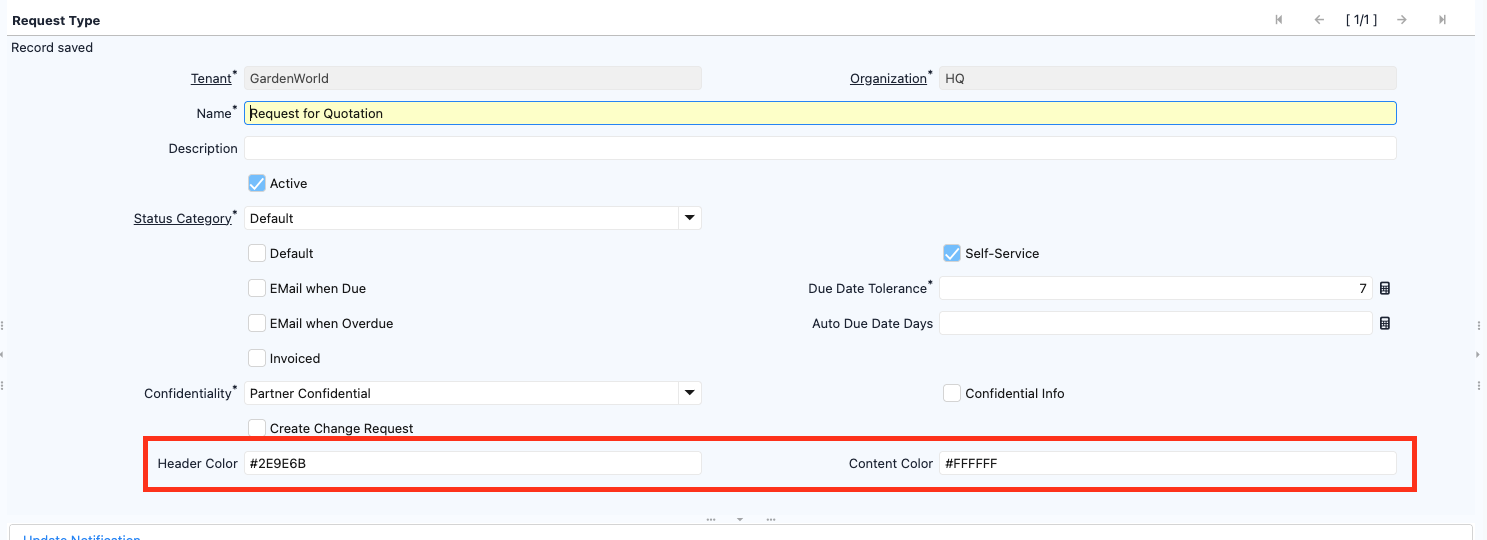
This example colours a field of a Request by its Request Type. The Request Type window has the fields Header Color and Content Color, and a Request points to its Request Type through the Request Type field (R_RequestType_ID).
-
Open the Request Type window.
-
Select the "Request for Quotation" Request Type and fill in Header Color with
#2E9E6Band Content Color with#FFFFFF. -
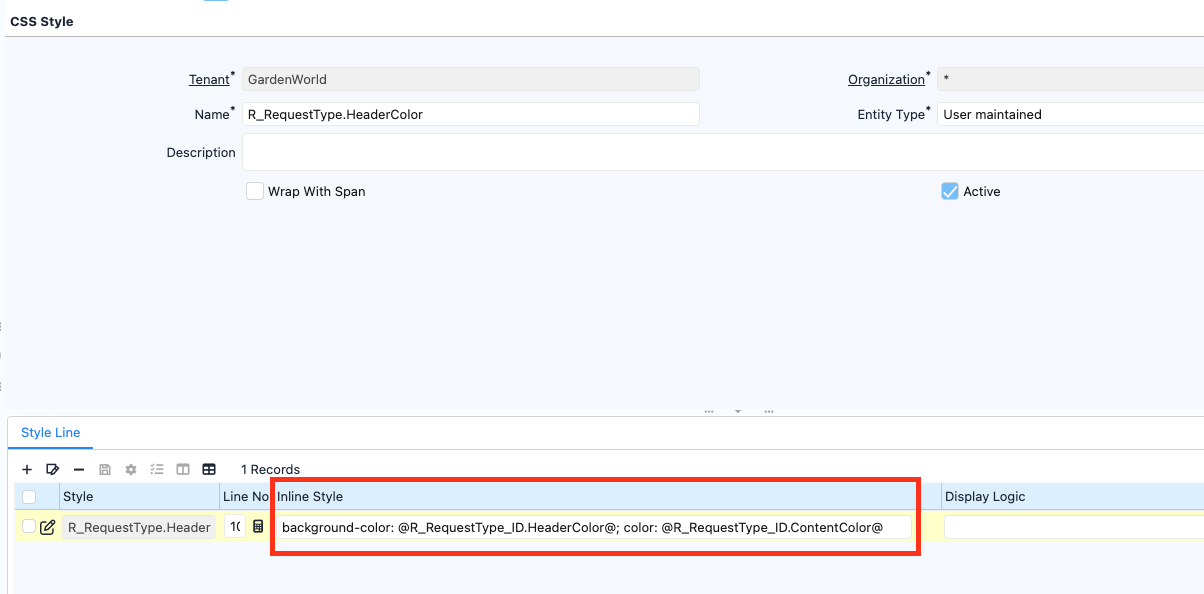
Open the CSS Style window and create a CSS Style named "R_RequestType.HeaderColor".
-
Go to the CSS Style window => Style Line subtab and add a line with this Inline Style:
background-color: @R_RequestType_ID.HeaderColor@; color: @R_RequestType_ID.ContentColor@ -
Open the Window, Tab & Field window => Request window => Tab => Field subtab.
-
Select the Request Type field and set Field Style to "R_RequestType.HeaderColor".
A Request with the "Request for Quotation" Request Type now shows the Request Type field with a green background and white text. A Request without a Request Type keeps the default look, because the variables stay unresolved and the browser ignores the invalid values.
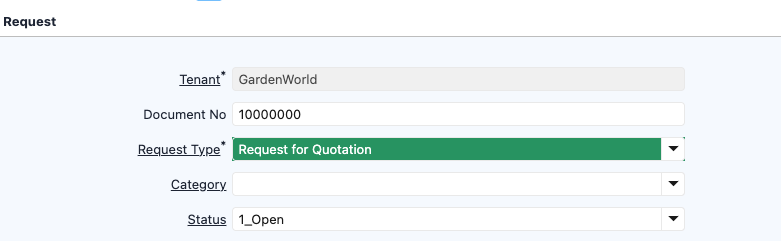
The same style also colours the Request Type column in the grid view.

Technical notes
MStyle.parseVariables(String, Evaluatee)does the substitution. Plugin code that builds style text from Style Lines itself can call it to behave the same way.MStyle.isSClass(String)andMStyle.isZClass(String)check the@sclass=and@zclass=prefix without regard to case. Use them instead ofstartsWith(MStyle.SCLASS_PREFIX)in code that applies a style.- The value of a referenced record is placed into the style of the page. The role access of the user to that referenced record is not checked. Secure columns are masked. Only users who can edit CSS Styles decide what is read.
Technical Info: IDEMPIERE-7163 | Pull Request #3412
Migration impact
A style with a single @, or with an odd number of @, is used as written. Text between two @ that does not match a column is left as it is. Text between two @ that matches a column is now replaced with the value of that column, even if it was meant literally. For example, content: "@Status@" shows the value of the Status column when the record has one. A pair @@ is converted to one literal @, so content: "@@" now shows @. Use @@@@ to keep two literal @ characters.