Custom key of document sequence
System Design: Norbert Bede, Cloudempiere
Developer: Peter Takacs, Cloudempiere
Feature Ticket: IDEMPIERE-6575
Custom Key of Document Sequence
This change allows to define a custom key for a Document Sequence, using values from the context of the document. If properly configured, it results in having multiple Sequence Number series (Sequence No tab) for a single Document Sequence.
Changes
- introduced a new "key" pattern to Prefix and Suffix fields: with that you can define specific values (context variables) that will be added to the
AD_Sequence_No.SequenceKey
AD_Sequence_No.CalendarYearMonth has been renamed to SequenceKey and its length increased to 255. Any existing custom code or queries referencing CalendarYearMonth must be updated.
Syntax
Add "/K" after the name of the context variable, before the closing '@', e.g. @ContextVariable*/K**@*
How to Configure
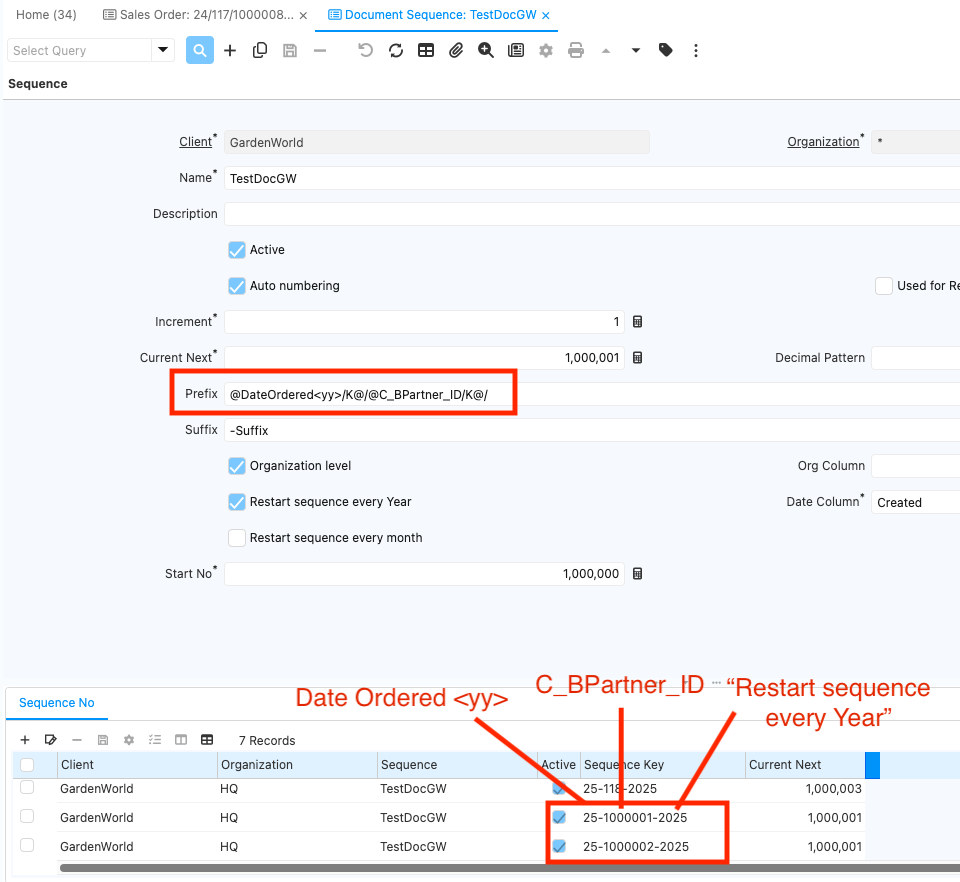
Let's configure a Document Sequence for Sales Orders, with custom key that consists of Date Ordered, C_BPartner_ID, and the year that comes from checking the Restart Sequence Every Year checkbox (legacy functionality).
- Define the Prefix or Suffix of Document Sequence like so: @DateOrdered/K@/@C_BPartner_ID/K@/
- Check the Restart Sequence Every Year checkbox The resulting custom Sequence Key will look like this: DateOrdered-C_BPartner_ID-Year, where '-' is the separator.
- Notes:* Instead of year, if want to print financial year, use FY instead of yy in above configuration. Financial year is taken Name of year in Calendar year and period.
Motivation, example use case
The motivation of this change was to find a solution for performance issues on concurrent document processing. Before, a shared lock could happen when a document was completed (e.g. when having multiple POS terminals in parallel), they were all accessing the same Sequence No at the same time, causing one document to wait for the other, slowing down the system.
After the change it is allowed to define a custom prefix, that will maintain a separate Sequence No for each POS terminal, without the need to define a separate Document Sequence for each. With defining such Document Sequence, every POS terminal's documents are accessing their own Sequence No, avoiding the share lock.