Using IAboutWindowTabFactory in Plug-ins
This tutorial was contributed by Jan Thielemann from evenos GmbH.
Goal
The goal of this tutorial is to show how to use the IAboutWindowTabFactory service in your plug-in project. Use this service to add custom tabs to the About window (opened by clicking the image in the upper left corner of the WebUI), alongside the default About, Credit, Info, and Errors tabs.
Prerequisites
Before you start, review the following tutorials:
Workflow
Step 1: Implement IAboutWindowTabFactory
Create a class that implements IAboutWindowTabFactory:
package org.evenos.tabtest;

import org.adempiere.webui.component.Tabpanel;
import org.adempiere.webui.factory.IAboutWindowTabFactory;

public class AboutWindowTabFactory implements IAboutWindowTabFactory {

    @Override
    public Tabpanel getTabPanel(String tabID) {
        // TODO Auto-generated method stub
        return null;
    }

    @Override
    public String[] getTabIDs() {
        // TODO Auto-generated method stub
        return null;
    }

}
Step 2: Create a component definition
Go to File > New > Other and select Component Definition from the Plug-in Development section.
Provide a unique name (e.g. org.evenos.tabtest.aboutwindowtabfactory). Select your AboutWindowTabFactory class, add a service.ranking integer property with a value > 0, and on the Services tab select org.adempiere.webui.factory.IAboutWindowTabFactory as a provided service.
The resulting XML:
<?xml version="1.0" encoding="UTF-8"?>
<scr:component xmlns:scr="http://www.osgi.org/xmlns/scr/v1.1.0" name="org.evenos.tabtest.AboutWindowTabFactory">
   <implementation class="org.evenos.tabtest.AboutWindowTabFactory"/>
   <property name="service.ranking" type="Integer" value="100"/>
   <service>
      <provide interface="org.adempiere.webui.factory.IAboutWindowTabFactory"/>
   </service>
</scr:component>
Step 3: Implement the custom tab
Use a private static final String to identify your tab. In getTabIDs(), return an array of all your tab IDs. iDempiere will call getTabPanel() for each ID and will use each ID to look up a translated message from the Message window as the tab's display name.
public class AboutWindowTabFactory implements IAboutWindowTabFactory {

    private final static String MY_TAB_ID = "org.evenos.tabtest.mytabid";

    @Override
    public Tabpanel getTabPanel(String tabID) {
        if (tabID.equals(MY_TAB_ID)) {
            Tabpanel tabPanel = new Tabpanel();

            Borderlayout borderlayout = new Borderlayout();
            tabPanel.appendChild(borderlayout);
            borderlayout.setHflex("1");
            borderlayout.setVflex("1");

            Center centerPane = new Center();
            centerPane.setSclass("dialog-content");
            centerPane.setAutoscroll(true);
            borderlayout.appendChild(centerPane);

            Vbox vb = new Vbox();
            vb.setWidth("100%");
            vb.setHeight("100%");
            vb.setAlign("center");
            vb.setPack("center");
            vb.setParent(centerPane);

            Vbox vbox = new Vbox();
            vbox.setWidth("100%");
            vbox.setAlign("center");
            vbox.setParent(vb);

            Image image = new Image(
                    "http://www.example.com/images/logo.png");
            image.setParent(vbox);

            // Add additional content as needed...

            return tabPanel;
        }
        return null;
    }

    @Override
    public String[] getTabIDs() {
        return new String[] { MY_TAB_ID };
    }
}
Step 4: Create a message and test
Create a message entry for org.evenos.tabtest.mytabid in the Message window to provide the tab's display name.
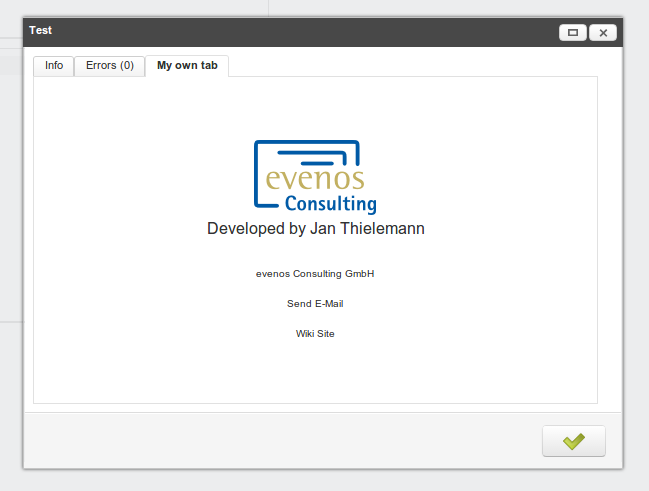
Open the About window and you should see your new tab: