IEditorFactory and IDisplayTypeFactory
Goal
This tutorial shows how to create and provide custom editors to iDempiere. We will:
- Create an editor that allows multi-selection of Business Partners in the User/Contact window.
- Add a new field to the
AD_Usertable to display the custom editor. - Create a new display type in the Reference window.
Prerequisites
Before you start, review the following tutorials:
- Developing Plug-Ins Without Affecting the Core
- Running Plug-ins Locally in iDempiere
- Using IModelFactory in Plug-ins
Preparing the model
Create a table to store the user-to-business-partner assignments using the dictionary for the new table in Table and Column and generate the model classes using the model generator.
Creating a DisplayType
Reference window
Log in as SuperUser with the System Administrator role on the System client. Open the Reference window, create a new entry:
- Name:
MultiSelection - Entity Type: User Maintained
- Validation Type: DataType
Note the record ID of this entry (click the record info button — the small numbers in the upper right corner). You'll need it for your IDisplayTypeFactory.
IDisplayTypeFactory
Create a class implementing IDisplayTypeFactory and a component definition with:
- A unique name
- The
service.rankinginteger property org.adempiere.base.IDisplayTypeFactoryas the provided service
Define a constant for your display type ID:
// Option 1: hardcoded (works if you control the ID assignment)
public static int MultiSelection = 1000001;

// Option 2: queried by name (preferred for portable distributions)
public static int MultiSelection = ((X_AD_Reference) new Query(
        Env.getCtx(), X_AD_Reference.Table_Name, "Name='MultiSelection'", null)
        .first()).getAD_Reference_ID();
Always check for your custom display type before returning a value from any IDisplayTypeFactory method. Returning a value unconditionally will override behavior for all other display types in the system.
public class DisplayTypeFactory implements IDisplayTypeFactory {

    @Override
    public boolean isID(int displayType) { return false; }

    @Override
    public boolean isNumeric(int displayType) { return false; }

    @Override
    public Integer getDefaultPrecision(int displayType) { return null; }

    @Override
    public boolean isText(int displayType) {
        if (displayType == MultiSelection) return true;
        return false;
    }

    @Override
    public boolean isDate(int displayType) { return false; }

    @Override
    public boolean isLookup(int displayType) { return false; }

    @Override
    public boolean isLOB(int displayType) { return false; }

    @Override
    public DecimalFormat getNumberFormat(int displayType, Language language, String pattern) {
        return null;
    }

    @Override
    public SimpleDateFormat getDateFormat(int displayType, Language language, String pattern) {
        return null;
    }

    @Override
    public Class<?> getClass(int displayType, boolean yesNoAsBoolean) {
        if (displayType == MultiSelection) return String.class;
        return null;
    }

    @Override
    public String getSQLDataType(int displayType, String columnName, int fieldLength) {
        if (displayType == MultiSelection) return "NVARCHAR2(" + fieldLength + ")";
        return null;
    }

    @Override
    public String getDescription(int displayType) {
        if (displayType == MultiSelection) return "MultiSelection";
        return null;
    }
}
IDisplayTypeFactory method reference
| Method | Purpose |
|---|---|
isID | True if the editor stores an ID referencing another table (like Table, Search, TableDirect) |
isNumeric | True if the editor displays numbers |
getDefaultPrecision | Default decimal precision for number formatting |
isText | True if the editor displays text |
isDate | True if the editor displays dates |
isLookup | True if the editor can provide a lookup (used by DefaultLookupFactory) |
isLOB | True if the editor displays Large Object Binaries |
getNumberFormat | Number format for the editor |
getDateFormat | Date format for the editor |
getClass | Java class for the column (used by the model generator) |
getSQLDataType | SQL data type (used when synchronizing columns to the database) |
getDescription | Human-readable description of the display type |
Creating the IEditorFactory (WebUI)
Create two classes: an EditorFactory implementing IEditorFactory and a WMultiSelectionEditor extending WEditor.
Create a component definition for EditorFactory with org.adempiere.base.IEditorFactory (ZK) as the provided service.
public class EditorFactory implements IEditorFactory {

    @Override
    public WEditor getEditor(GridTab gridTab, GridField gridField, boolean tableEditor) {
        if (gridField == null) return null;

        WEditor editor = null;
        int displayType = gridField.getDisplayType();

        if (displayType == DisplayTypeFactory.MultiSelection) {
            editor = new WMultiSelectionEditor(gridField, gridTab);
        }
        if (editor != null)
            editor.setTableEditor(tableEditor);

        return editor;
    }
}
Implementing WMultiSelectionEditor
The editor shows all Business Partners as a scrollable checklist. Selecting or deselecting a checkbox is saved to eve_user_bpartner when the user clicks Save.
Full implementation
public class WMultiSelectionEditor extends WEditor implements StateChangeListener {

    private boolean m_ReadWrite;
    private Listbox box;
    private int m_AD_User_ID = 0;
    Set<Object> items = null;

    public WMultiSelectionEditor(GridField gridField, GridTab gridTab) {
        super(new Vlayout(), gridField);

        if (gridField.getGridTab() != null) {
            gridField.getGridTab().getField("AD_User_ID").addPropertyChangeListener(this);
            gridField.getGridTab().addStateChangeListener(this);
        }

        Vlayout layout = (Vlayout) this.getComponent();
        layout.setHeight("100px");
        layout.setWidth("100%");

        Div div = new Div();
        div.setHeight("100px");
        div.setStyle("overflow: auto");
        div.setParent(layout);

        box = new Listbox();
        box.setCheckmark(true);
        box.setMultiple(true);
        box.setParent(div);
        box.addEventListener(Events.ON_SELECT, this);

        List<MBPartner> bps = new Query(Env.getCtx(), MBPartner.Table_Name, null, null).list();
        for (MBPartner bp : bps) {
            box.appendItem(bp.getName(), bp.getC_BPartner_ID() + "");
        }
    }

    @Override
    public void onEvent(Event event) throws Exception {
        if (event.getTarget() instanceof Listbox) {
            Listbox lbox = (Listbox) event.getTarget();
            items = new HashSet<Object>();
            for (Listitem item : lbox.getSelectedItems()) {
                items.add(item.getValue());
            }
            // Signal to the framework that the field has unsaved changes
            GridTab gridTab = gridField.getGridTab();
            gridTab.getTableModel().setCompareDB(false);
            gridTab.setValue(gridField.getColumnName(), UUID.randomUUID().toString());
        }
    }

    @Override
    public void setReadWrite(boolean readWrite) {
        m_ReadWrite = readWrite;
        if (gridField != null && gridField.getGridTab() != null && box != null) {
            updateSelection();
            for (Listitem item : box.getItems()) {
                item.setDisabled(!readWrite);
            }
        }
    }

    @Override
    public boolean isReadWrite() { return m_ReadWrite; }

    @Override
    public void setValue(Object value) { /* no-op for this editor */ }

    @Override
    public Object getValue() { return null; }

    @Override
    public String getDisplay() { return null; }

    @Override
    public void stateChange(StateChangeEvent event) {
        if (event.getEventType() == StateChangeEvent.DATA_SAVE) {
            if (items == null) return;

            String where = MEVEUserBPartner.COLUMNNAME_AD_User_ID + "=?";
            List<MEVEUserBPartner> eubs = new Query(Env.getCtx(),
                    MEVEUserBPartner.Table_Name, where, null)
                    .setParameters(gridField.getGridTab().getRecord_ID()).list();
            for (MEVEUserBPartner eub : eubs) eub.deleteEx(true);

            for (Object item : items) {
                MEVEUserBPartner eub = new MEVEUserBPartner(Env.getCtx(), 0, null);
                eub.setAD_User_ID(gridField.getGridTab().getRecord_ID());
                eub.setC_BPartner_ID(Integer.parseInt(item.toString()));
                eub.saveEx();
            }
        }
        if (items != null) items.clear();
        items = null;
        updateSelection();
    }

    @Override
    public void propertyChange(PropertyChangeEvent evt) {
        if (evt.getSource() instanceof GridField
                && ((GridField) evt.getSource()).getColumnName().equalsIgnoreCase("AD_User_ID")) {
            if (evt.getNewValue() != null) {
                int user = Integer.parseInt(evt.getNewValue().toString());
                if (m_AD_User_ID != user) {
                    m_AD_User_ID = user;
                    updateSelection();
                }
            }
        }
    }

    private void updateSelection() {
        String where = MEVEUserBPartner.COLUMNNAME_AD_User_ID + "=?";
        List<MEVEUserBPartner> eubs = new Query(Env.getCtx(),
                MEVEUserBPartner.Table_Name, where, null)
                .setParameters(gridField.getGridTab().getRecord_ID()).list();
        box.clearSelection();
        Set<Listitem> selected = new HashSet<Listitem>();
        for (Listitem item : box.getItems()) {
            for (MEVEUserBPartner eub : eubs) {
                if (item.getValue().toString().equals(eub.getC_BPartner_ID() + "")) {
                    selected.add(item);
                }
            }
        }
        box.setSelectedItems(selected);
    }
}
Key design decisions
Saving on DATA_SAVE, not on every click. Clicking a checkbox calls onEvent(), which stores the selections in items and signals to the framework that the field has unsaved changes (via UUID.randomUUID()). The actual database write happens in stateChange() only when StateChangeEvent.DATA_SAVE fires. This matches iDempiere's save-on-button behavior.
Tracking AD_User_ID changes. propertyChange() watches the AD_User_ID field. When the user navigates to a different record, the user ID changes and updateSelection() reloads the checkboxes. The m_AD_User_ID guard prevents rebuilding the selection from a spurious property change event that fires after save.
Read-only support. setReadWrite() disables or enables each checkbox individually.
StateChangeEvent reference
| User action | Events fired |
|---|---|
| Window opens | DATA_QUERY |
| Lookup button clicked | DATA_SAVE |
| Lookup OK clicked | DATA_QUERY |
| Refresh button | DATA_REFRESH_ALL |
| Undo with changes | DATA_IGNORE, DATA_REFRESH |
| Save button with changes | DATA_SAVE, DATA_REFRESH_ALL |
| New button (no changes) | DATA_IGNORE, DATA_NEW |
| New button (with changes) | DATA_SAVE, DATA_NEW |
| Navigate to another row (no changes) | DATA_IGNORE |
| Navigate to another row (with changes) | DATA_SAVE |
Result
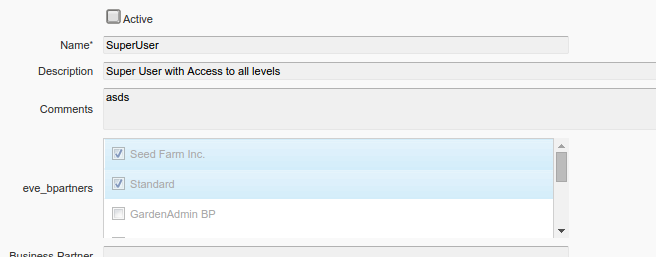
The custom editor renders as a scrollable checklist of Business Partners. Checkmarks are saved when the user clicks the window Save button, and the display reflects the current record when navigating between user entries.
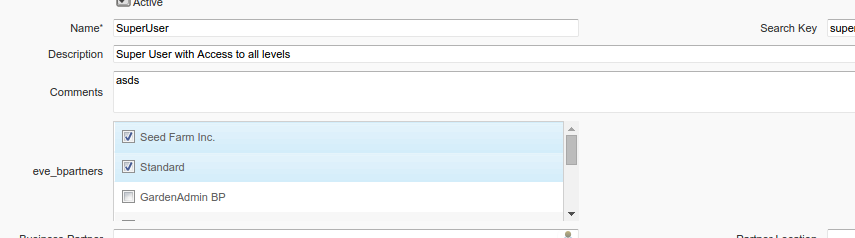
The editor is automatically disabled when the record is in read-only mode: